
RELEASE Onstage v1.2.8 is live: Bluetooth MIDI rework, improved USB audio and Studio Driver stability, and crash fixes.
BUILT FOR LIVE MUSICIANS

The pro keys experience for budget hardware.

Multi-layer sounds, setlists, and ambient pads for church, stage, or rehearsal. Simple to use, with no complex setup required.

Seamless Patch Switching • Ambient Pad Engine • Smooth Sound Layers
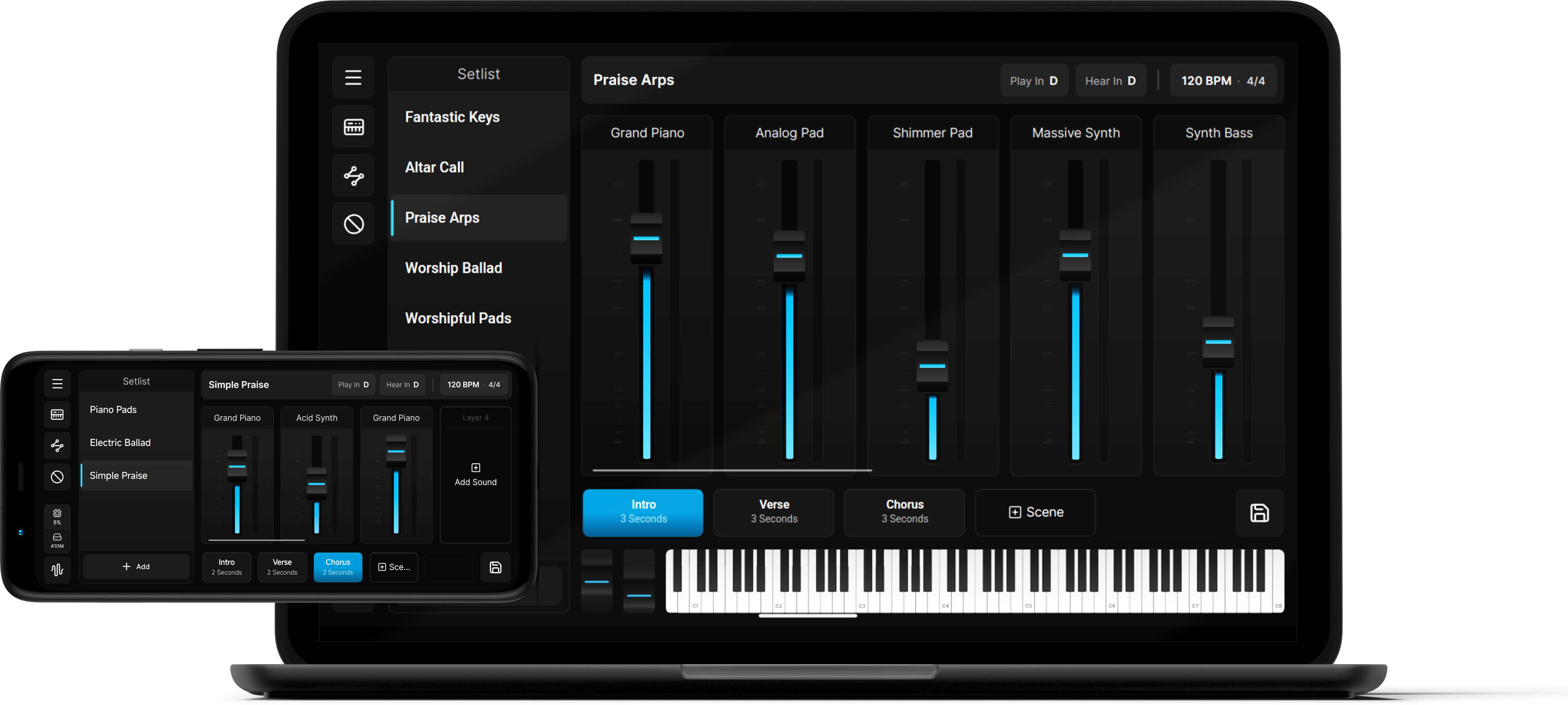
Onstage live keys performance view
COMPLETE WORKSTATION RIG

Everything built into Onstage

A complete breakdown of all keys workflows, sound controls, and performance features included in the workstation.

CORE ENGINE

Sound Engine & Layering

  • Up to 16 sound layers per patch
  • 5 Dynamic Scenes per patch with smooth volume crossfades
  • Multi-layered Ambient Pad Player engine
  • Customizable Key & Velocity Splits per layer
  • Semitone Play-In & Hear-In Transposition
DSP & PATTERNS

Effects & MIDI Processors

  • 3-Band Parametric EQ per layer
  • Studio Effects: Reverb, Delay, Chorus & ADSR
  • Polyphonic Arpeggiator with velocity patterns
  • One-touch Chord Triggers & Inversions
  • Key-mapped 16-Step Sequence Pattern generator
STAGE CONTROLS

Performance & Workflow

  • Setlist Management for fast patch switching
  • Instant MIDI Learn & Fader Pickup
  • Unified Content Packs (.onpack) import & export
  • Cross-platform on Windows PC & Android
  • Self-contained Offline Operation
SEE IT IN ACTION

All 10 full-version preset patches, played live on an Android phone

From acoustic pianos to ambient pads and synth stacks, hear every preset switch instantly with no cutoffs or stuck notes. No laptop required.

Interface Gallery

Click any screenshot to view in full resolution.

GET ONSTAGE

Start free. Upgrade anytime.

Demo Mode and the Full Version are the same app. The free Demo Mode has no time limit but limited features, and a one-time license key unlocks the full version.

1

Download Onstage

Free Demo

One installer for both Demo and Full. Runs free in Demo Mode, unlock everything with a license key anytime.

Quick Start Guide
2

Unlock the Full Version

Already installed the app from step 1? A one-time license key instantly upgrades it, no second app to download.

Demo Mode

Free Tier

What every installation can do out of the box, forever.

Indefinite Usage (free forever, no time limits)
Full MIDI Learn & controller mapping
Includes Onstage Basics Pack & 3 sample patches
1 Active Setlist limit (max 2 Patches)
Up to 3 sound layers & 3 scenes per patch
Single-layer Ambient Pad Player engine
UNLOCK FULL VERSION

License Key

Full Version
$19.99 One-time

Not a separate app: this key unlocks the Onstage features in the same app. One-time purchase, activates 1 device at a time.

Full SoundFont (.sf2) imports & custom sound library
Unlimited Setlists & Patches without restrictions
Stack up to 16 sound layers and 5 scenes per patch
Multi-layered Ambient Pad Player engine
Full Sound Effects (3-Band EQ, ADSR Envelopes, Reverb, Chorus, Stereo Delay)
Configurable MIDI Patterns (Arpeggiator, Chord Triggers, Up to 16-step Sequencer)
Onstage Essentials Included: Comes with 33 high-quality sounds (synths, pianos, pads, orchestral) plus 10 curated preset patches!
Buy License Key Pay via QR / E-Wallet PH Scan to Pay · Online Banking & E-Wallets

Store purchases (card / PayPal) are instant. QR / Online Banking / E-Wallet Payments are processed the same day.

Requires that the free demo is already installed. Bought before installing? No problem. Just activate it after you download.

HELP & LICENSING

Frequently Asked Questions

Here is everything you need to know about your license and transferring Onstage between your devices.

Yes! Just unlink your license from your old phone by opening Onstage, tapping on 'About Onstage', and clicking on the 'Licensed to <your email>' button. After unlinking, you can immediately use that license key to activate Onstage on your new phone.
Yes! A single license key can activate either the Windows or Android version, as well as any future platform once Onstage supports it too. You can unlink your license from your previous device at any time and use that same license key to activate Onstage on your new device.
Each license key activates 1 device at a time (Windows, Android, or any future platform once supported by Onstage). If you need to perform with Onstage on multiple active devices simultaneously on stage, you will need to purchase an additional license key.
Onstage requires single-preset SoundFont (.sf2) files for performance and memory optimization during live shows. If you have multi-preset SoundFonts, use free SoundFont editing software like Polyphone to split and export individual presets before importing them into your sound library.

Lightweight and responsive, optimized for live performance.

Built to run smoothly on stage laptops and mobile devices without consuming heavy system resources or requiring expensive hardware setups.

OPERATING SYSTEM Windows 10/11 & Android 10+ x64 & ARM PCs, Phones & Tablets
HARDWARE REQUIREMENT Standard / Dual-Core Lightweight and resource-efficient
MEMORY (RAM) 4 GB Standard RAM Low memory footprint for fast sound loading
HARDWARE / MIDI USB MIDI & BLE MIDI Plug-and-play & Bluetooth controller compatibility
SoundFont (.sf2) Import Note: Onstage requires single-preset SoundFont (.sf2) files for maximum performance and low memory consumption on stage. If you have multi-preset SoundFonts, use free tools like Polyphone to split presets before importing.